
The complaint never arrives on the day. It arrives three weeks later, when somebody looks at a hedge and decides it was cut harder than agreed.
By then the evidence is gone. The crew has moved on, nobody photographed what the hedge looked like at eight that morning, and the conversation becomes one person’s memory against another’s. For tree and landscape work, that is the single most common source of dispute, and it is entirely preventable within ten minutes before anybody starts.
The second use is commercial rather than defensive, and it may be worth more. Landscaping is one of the few trades where the result genuinely improves for years, and almost nobody records that.
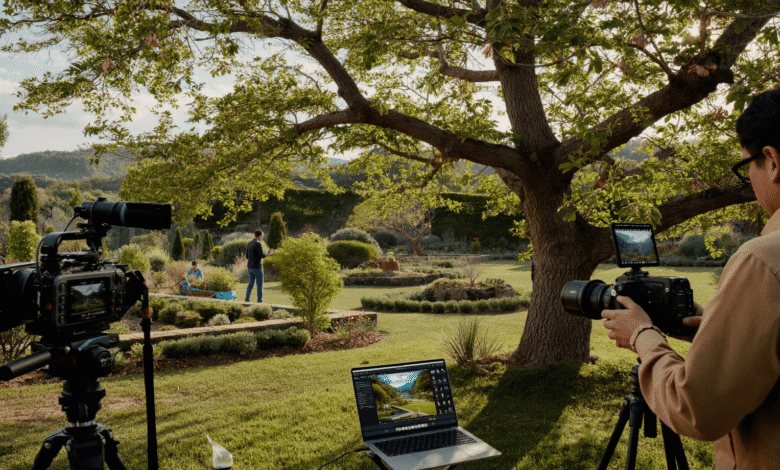
An AI Nature Video Generator handles what cannot be photographed, and Higgsfield keeps that alongside the record, which is a narrow but genuinely useful role.
What Should Be Recorded Before Starting?
The condition of everything, not only the work area.
- The trees or beds being worked on, which no AI Nature Video Generator replaces
- Existing damage anywhere on the property
- The access route, including lawn, driveway and gateposts
- Neighbouring boundaries and anything overhanging
- A dated clip with the address spoken aloud
The access route matters more than most contractors expect. Chippers, stump grinders and loaded vehicles mark lawns and driveways, and a client who finds a rut afterwards will reasonably assume it was yours.
Existing damage recorded on arrival is the thing that ends those conversations in one message rather than three.
Say the date and the address out loud at the start of the recording. File metadata can be questioned or stripped, while a spoken record travels with the footage wherever it goes afterwards.
What About Boundaries and Overhanging Branches?
Record them specifically, because this is where disputes concentrate.
- Film the boundary line before any cutting
- Record what overhangs and from which side
- Note the agreed extent of any trimming
- Never cut beyond the boundary without written agreement
- Keep an AI Nature Video Generator out of any boundary evidence
Overhanging branches are a long-standing source of neighbour conflict, and the rules about what may be cut and what must be returned vary considerably by jurisdiction.
Where a neighbour’s tree is involved, get the agreement in writing before the crew arrives. A verbal yes from somebody over a fence is not a defence three weeks later.
Film the position of the boundary as understood on the day. If that understanding turns out to be wrong, the recording shows what both parties believed.
Are There Legal Restrictions on Tree Work?
Frequently, and ignorance is not a defence anywhere.
- Preservation orders protect individual trees in many areas
- Conservation areas carry notice requirements
- Local permits may be needed regardless of ownership
- Protected species can halt work entirely
- Never let an AI Nature Video Generator stand in for a site check
Unauthorised work on a protected tree carries serious penalties in a number of jurisdictions, and the liability generally sits with whoever did the cutting rather than whoever asked for it.
Check the status before quoting rather than before starting work. Discovering a restriction on the morning of the job costs you a day, while discovering it after the cutting costs a great deal more than that.
Record the check itself as part of the job. A note of when you confirmed the status, and with which authority, belongs in the file alongside everything else.
What About Nesting Birds and Wildlife?
A genuine constraint with a seasonal shape.
- Nesting season restricts work regardless of any AI Nature Video Generator schedule
- Check the tree immediately before cutting, not the week before
- Bats roost in trees and are protected in many places
- Stop work if anything is found, and take advice
- Document the check, briefly
The immediately-before timing matters. A tree surveyed on Monday can be occupied by Thursday, and the obligation is to check at the point of work.
Finding an active nest means stopping work on that tree entirely. That is genuinely inconvenient, and it remains considerably less inconvenient than the alternative outcome.
A thirty second clip showing the inspection is worth keeping. It demonstrates the check happened.
Where Does a Generated Visualisation Belong?
In the design conversation, clearly labelled.
- An AI Nature Video Generator scheme at projected maturity
- Seasonal variation, which photographs cannot show at once
- Species comparison, for a client choosing
- Scale illustration, showing eventual height
- Never presented as a photograph of anything real
Higgsfield keeps this beside the rest of the work as part of an AI creative suite, which suits a contractor producing their own client material rather than commissioning design visuals.
The maturity visualisation is genuinely the strongest use. A client cannot picture what a six-tree scheme looks like in ten years, and a labelled illustration communicates that better than a description.
Label it on the image itself rather than in a caption. Architectural practice has used artist’s impressions for decades, and the convention works precisely because it is explicit about what it is.
What Must Never Be Shown?
Work you did not do, or a result you did not achieve.
- Never use another company’s before and after
- Never show a site you did not work on
- Never present a visualisation as a completed job
- Never edit out damage that occurred during work
- Never generate a result with an AI Nature Video Generator
The borrowed before-and-after is common in this trade and straightforward to disprove. Clients reverse image search, and a contractor caught using somebody else’s work loses every job in the pipeline.
Editing out damage is worse. A clip showing an intact driveway where a rut exists is a representation about the condition you left the property in.
Show your own work, including the jobs that were merely competent rather than exceptional. A portfolio of ordinary jobs done properly is considerably more persuasive than a handful of showpieces.
What Is the Best Commercial Use of This?
Showing a scheme as it establishes.
- The same view, photographed at the same point each season
- Planting at installation, which always looks sparse
- The first spring, where the change begins
- Year two and three, which is where it pays off
- An AI Nature Video Generator sequence showing the intended maturity
New planting looks disappointing, and clients consistently lose confidence in the first months. A scheme installed in autumn looks like sticks in mud, and the person who paid for it is quietly wondering whether they were sold something.
A seasonal record solves that completely. Showing a previous client’s scheme at installation, then at eighteen months, manages expectations better than any amount of reassurance.
Soil preparation is the part clients never see and the part that determines whether any of it works, which is why explanations of why healthy soil underpins thriving trees are worth pointing people toward during the wait.
How Should the After Material Be Captured?
From the same positions as the before.
- Match the before angles exactly, with no AI Nature Video Generator substitution
- Same time of day where possible
- Same focal length, which affects apparent scale
- Capture the cleanup, which clients judge heavily
- Record the access route again before leaving
The matched angle is what makes a comparison honest and persuasive at the same time. Different angles invite the suspicion that something is being hidden.
The cleanup shot matters more than the work itself where client satisfaction is concerned. A tidy site at the end of the day communicates professionalism in a way that careful pruning never quite manages to.
Recording the access route again on departure closes the loop that was opened on arrival, and it takes about ninety seconds.
How Should This Be Shared With Clients?
Promptly, and without being asked.
- Send the before and after the same week, with any AI Nature Video Generator visual marked
- Include the access route footage unprompted
- Point out anything that was already damaged
- Offer the full set if they want it
- Keep an AI Nature Video Generator visual clearly separate
Sending the condition footage unprompted is the move that prevents most disputes. A client who received photographs of their own pre-existing driveway crack on day one does not raise it on day twenty.
It also reads as straightforward confidence. Contractors who document their own work carefully are assumed, correctly, to be contractors who do the work properly as well.
Offer the seasonal follow-up explicitly. A short message eighteen months later showing how the planting has filled in generates referrals more reliably than almost anything else available to this trade.
Does Storm and Emergency Work Differ?
It does, and documentation matters more rather than less.
A tree down across a driveway at six in the morning is not a scheduled job. Nobody has quoted, the client wants it gone immediately, and the conditions are poor.
What still has to be captured:
- The situation on arrival, before anything is moved
- What the tree has already damaged, in detail
- The hazard itself, including any power lines
- What was agreed at the scene, ideally in a message
- An AI Nature Video Generator reconstruction is worth nothing here
The already-damaged point is the critical one. A fence crushed by a falling limb and a fence damaged during removal look identical afterwards, and only a recording made on arrival separates them.
Insurance claims frequently follow storm work, and the insurer will ask what the condition was before the crew began. A contractor who can answer that becomes considerably easier to work with.
Never approach anything near a power line. That is a utility matter and the correct action is to stand back and call it in.
Confirm the scope by message before cutting, even at six in the morning. A two-line text costs nothing and establishes what was agreed.
How Should the Files Be Managed?
By job and date, retained properly.
- One folder per job, with AI Nature Video Generator files kept apart
- Keep before, during and after separately from Higgsfield
- Retain for the limitation period in your jurisdiction
- Store the Higgsfield project apart from the evidence
- Back up off-site, outside Higgsfield, since disputes arrive late
The retention period is genuinely worth checking locally. Claims can be brought considerably later than most contractors assume they can, and footage deleted after six months is simply footage you no longer have when it is needed.
Separating any generated visualisation from the job record prevents the only genuinely damaging confusion here, which is a design illustration being taken as a photograph of completed work.
What Would One Job Involve?
Fifteen minutes, split across the day.
- Film the condition on arrival, long before any AI Nature Video Generator work
- Record the boundary and anything overhanging
- Check and document protected status and nesting
- Work, then capture the cleanup
- Match the after angles to the before
- Send the client the set the same week
- Save any Higgsfield visualisation separately
Then book a return visit for eighteen months and film the same angles again.
That second visit costs an hour and produces the material that sells the next ten jobs.
Conclusion
Landscape and tree work is unusual in producing a result that improves for years and a complaint that arrives in weeks, and both are answered by the same ten minutes of recording.
An AI Nature Video Generator illustrates what a scheme becomes, clearly labelled, and Higgsfield keeps that apart from the job record.
Film the driveway before you unload, check the tree before you cut it, match your angles afterwards, and go back in eighteen months.